MAKE SURE UR PHONE IS
THEN PROCEED WITH THE FOLLOWING
2. After download this file and install in mem. card
For All Gage installer.sis for 240x320(n95,c5.00,E51. Many. not for n73)
Error fixture for (os9.3) .sis (3KB)
HAVE FUNNN.......
3)N73 NGAGE INSTALLER ONLY FOR N73
1. Install this in memory card
ngage installer N73.sis
2. Using xplorer open this .zip and extact to E/private
10202be9.zip
3. Move this file in to folder C:/ private/10202Be9
20001079.txt
4. Install this 2 files
ngage patch n73.sis
auto start ngage n73sis
when ever u want to play games restart ur mobile becoz n73 have memory problem Enjoy friends .
3. Your work is done now download this .n-gage file format games and MOVE in memory card ngage FOLDER . .
Go to Rompacture and Make Open4all GREEN -TO- BLUE by simply clicking on it other wise u will get errors
Free .n-gage file format games
Crash nitro bandicoot
Full asphalt 3 (13MB)
Fifa09
Bounce ball hd 3d
Poker
BEST Full Brothers in arm (28MB)
full pandimonium (25 MB)
Snakes
Metal Gear solid
Tetris
Worms word party
one fighting best (26 MB)
Resident evil
Brain challenge
Sims pet dog 3D Hd
4. Now you can play ngage games. .in s60v3 enjoy hd gaming
Showing posts with label SymBiAn HaCkS. Show all posts
Showing posts with label SymBiAn HaCkS. Show all posts
Wednesday, 13 June 2012


Saturday, 21 April 2012
Tutorial: Edit Splash Screen and Name of Opera Min

HOW TO USE PIXELFORMER
1.Open pixelformer.
2. Create new file: default(98x24) or any size you like BUT be sure that the size will not exceed on 722 BYTES.
3.Make your own design.
4.To save, click file>save export. And save it in png format. Thats it.
HOW TO USE PNGOUT
1. Download the file. Save it in a drive where you can easily access it using command prompt. (example, i save it in drive C)
2. Place png file you created at same C: where pngout.
3. Open command prompt.
Syntax: pngout <input.png> <output.png>
example:
c:\pngout sampleinput.png sampleoutput.png
Or simply drag the png file to the icon of PNGOUT.EXE.. Be sure that they are on the same Folder.
EDITING SPLASH SCREEN
1. Open the JAR FILE using WINRAR. Extract the V FILE in a any folder.
2. Open the HEX EDITOR. Open V file with it.
3. Press Ctrl + F and Search for the word PNG, than press f3 (find next) again to find next PNP.(There are only 2 PNG in the v file). Now select from ‰PNG to END®B`‚ (starts with “%PNG and end with END®B`‚)
Its like:
‰PNG........IHDR...b.........6ÂØ›...`PLTE#..Æ.'ÔW\ ùõóÿÿÿÊ,4¬§¦òÉËììêúìíÐDI€{z™”’à.…c_^ã’”¿º¹êª¬ÑÍÍÝÚ ÚôÖÔøãå=87+'&4/.Üqvrml[VUIEDkfePLJ–.Ü2...-IDATx^핉ŠÛ@.Dûš[÷-ÙÞýÿ¿ŒZ.ë„....!.#×ЦŸºf@ .\..ñ.ѤTYI¬ˆPR¤ÜÉ{J©ÙM›’.±ÙsÿŒÅ¶ÙÒ|´ â.ÒLˆ9¿Cð.ËÁ.hEF}\’.XEØ›m@:ct€>bù.¢…iäÍM.4¿LQ%/.¯Ø¶-.á.QoLÿNÒ°€USA‚J^.:¤ÃæXJGΑ1ó.ëÈ 9‘@µ‹$k.Í•f.v,Ô,C¥¬ô!b.Ÿ.pW`V´.¢¼òqHºÌ\.Æ gDu.ÑIÀÙÄ\ÊuK8Ë..U1z.?¦.q.Y2¸.).š[‚æBäø8lÀ(.•mŽ¹pŒ,...ïW.e]Ñð‰h,Øí•.ìD.^ç+ž.3ºÃò† Í.Ãn....ϾÜÏØí6ƒÖÃMä6H.éDdZ.‡Ÿ§¨.ÛkPG.„¡ÄH«.ö|pˈ« ÜyU½.à=d_.VKÃôŒ¨1?¬:•®.1ç›ÂŽ`ÂÙõù‰X€Å‚µÐŠ‡å%" .j´…;§ÐÈëk¼.q”.ÄǨG½.ŸÚ¤x‰..gÞ‡ .‡†.v=FþŠØ‘t"n“r¦QÓ.?_#8"¹Ðå.{í.Ô…‡ÑCÍ‘..«Ý5...ñDÜ ‡íZ..‘éþ.!aFÕ.öק՛Çv¼Fm} Xÿ.Ë.1hB<..nz.X..õC.ŠÈÙÕîL¨sÝj9ìÅn-p8jÞë“/¯‹½î.û›ï…"ä›ôo#4êïÖ.#q53Å÷.À....IEND®B`‚
4. Now open your PNG file with hex editor but not close V file, PNG file open in new tab. Press Ctrl + A to select all of it. And then press ctrl + c (to copy).
5. Now switch to V FILE tab and press CTRL + B (Paste Write). Now all will colored in red, now see at end at IEND®B`‚
If you see another IEND®B`‚ after some lines like in 2nd image than select it from at end or red color to IEND®B`‚
It happen when size of your PNG is less than original.
6. Goto EDIT>>FILL SECTION. Under hex-values, put 00 and then click OK.
7. And then Click FILE>>SAVE or simply Ctrl + S to save your work.
8. Open jar file with winrar and click on Add and select V file and OK.
Now you ready to run jar file to see the changes.
To Change Title Name of Opera Mini at StartPage
1. Press Ctrl + F and Search for Opera Mini.. and replace with desired name but within 10 characters.
For exp see in image I've change it to mannuforal.
If your text is less than 10 characters than press space for remain characters, for exp if name is mannu= 5 characters, than press 5 time space key to complete 10 characters.
Saturday, 10 March 2012
How to Edit the Java Class and Java Language of Java ApplicatioNS

hello all today i decide to make a new thread on how to edit java class file to translate ucweb java browser or any kind of java app,
with this method you will get your own java app in your native language,here we go..
1.right click on ucweb.jar open with winrar.
2.navigate to WebClient.class then extract to specified folder you prefer.
3.Run classeditor (ce.jar) and open WebClient.class u have extracted before
4.click on Modify Mode to enable(on) modify java class.
5.click on Constant Pool button to view java.class string.
6.navigate on string u wish to edit and click it, as example I click on DYNAMIC DATA,after click this string i will get navigate go to 433.
9.then put the number you remember before(in this case index 433=8) then click Go button.
10.click on modify button then click on index string to modify string value.
11.after edit all string value u wish to translate save this file.then close class editor (ce.jar),(be carefull my friend,not all class string can edit,if you make mistake the java app will crash and won't start)
12.Open again ucweb.jar with winrar- right click -click add file to archive
13.browse WebClient.class your modified then click ok to add file on archieve,close the winrar.now transfer ucweb.jar to your phone for installation process.
Thats it,edit and translate java class is easier but long time to finish,now you will get ucweb java in your native language. thanks give your testimony here ok
How to Manually Remove a Virus from Nokia S40 java phones
This tutorial will teach you how to manually remove virus from your java phones
.
DOWNLOAD BLUEFTP
remember to always READ IN EDIT DATA....GOTO OPTION ON UR BLUEFTP GOTO APP ACCESS CHANGE DATA READING TO

ALWAYS EVERYTIME
OPEN UR blueftp then locate ur memory card>E< note if there is avirus,its we be shown as >index.tr<,>autorun.exe e.t.c then if you seen something like this,it is called the java visiblevirus,this invisible virus is always affecting java phone to be >slow< or its we be causing off $ on e.t.c And when trying to delete those invisible files with ur blueftp,its we replied you is>unable to delete file,its simple means the invisible virus cannot be deleted
>ok let just locate the files one after the other,remember we are still making use of our blueftp
Then press 7
Then you we be shown 3 then it we display a markable Boxes
READ FLAG
HIDDEN FLAG
WRITE FLAG
TRIVING FLAG e.t.c
ok kindly mark yourWRITE FLAG AND READ FLAG THEN UNMARK THE HIDDEN FLAG AND SAVE ITyfk can know close ur blueftp.
Goto to ur MEMORY CARD THEN YOU WE NOTICE THAT UR VIRUS HAS BEEN DELETED
Then fullfilled ur work done,may sure you restored your factory settings
YOUR NOKIA PHONE RESTORE SETTINGS CODE IS 12345 then restored and enjoy ur java phones from flashing problems
How to Create a Custom theme for Nokia s40 Java Phones(With blueftp, winrar or online
It has been a custom with me to always do extensive research before posting any tutorial. Lol and behold i present to you 3 ways by which you can get your own customized theme on your nokia s40 phones

Requirements:
-A Nokia s40 java phone
-A good theme with .nth extension(necessary)
-winrar.exe on your pc(if you are doing this on pc)
-Blueftp on your phone(if you want to edit with phone)
-A pc(if you want to create on pc)
-Internet connection(if you want to create online)
Download blueftp here
NOW FOR YOU TO CREATE
ON S40 JAVA
Nokia S40 Phones support the
"nth" type theme. You can create
your own theme without any
software. Follow the below instructions:
Copy any theme from your mobile
to computer
Rename your theme and change its
extension to ".rar" [Example:
watertheme.nth to watertheme.rar] Now right-click on the renamed
file and extract its content to a
empty folder.
Now Check which image is used
for what purpose [check the
theme on mobile]. now replace the images and
ringtones that you want to use in
your theme with already existing
images and ringtones. make sure u
don't change the name.[rename
your images to the same same as the existing image in the theme
had. same for tones too].
Now the folder contains all the
info of the theme as it is. only
the content has changed not the
name. so the file named theme discriptor will take the new
files for your theme.
Now right-
Now right-click anywhere in the
folder's empty space and select
the option "Add to
watertheme.rar".
Now you will have a
watertheme.rar in the same folder.
Rename the file to
"watertheme.nth" from
"watertheme.rar".
You're Done. copy the theme to
your phone and test it...!!
Method 2
FOR THIS, YOU WILL NEED A SOFTware installed in your nokia s40 mobile.. Blue FTP....download it from link above.
.step-by-step..!! 1.] Change extension of an existing theme from '.nth' to '.zip' using blueFTP.
2.] Now extract the contents of '.zip' renamed file to an empty folder using BLUEFTP
3.] OpeN the folder WHERE u xtracted the files,in ur phone gallery. There will be certain image files which appeared in old theme. Delete the ones which u want to edit and instead paste there ur desired images with the same name and extension of the file which u deleted....plz don't edit other system files.!
4.] Now, using BlueFTP,repack (COMPRESS) the contents of whole folder after suitable editing, by clicking on 'compress file (.nth)' in blueFTP menu.
5.] Yippee....ur very own new theme is created...generated '.nth' file is the desired theme...!!name it according to ur wish.... I HOPE THE TUTORIAL IS crystal-CLEAR TO everyone It is advisable to not rename the file in whole process...change only the extension and not the name...u cn rename it after completion.
Method 3 go to ownskin.com with your pc or
m.ownskin.com using mobile.
HOW TO HACK THE STARTUP AND SHUT DOWN OF NOKIA S60V3 PHONES.
Change Your Boot Up Screen & Sound - S60v3
by BALA MURALI MAYA
I have painstakingly packaged the required files into a zip archive which i ve uploaded into s60v3 folder in our download section. The link is at the bottom of this post
Now when the S60 3rd edition security is broken and when the ROM patcher is available the only real limit for phone customization is the edge of our imagination.
There are bunch of talented young hackers around and you can expect much more cool hacks and patches to come shortly.
Anyway, speaking about the hack, first of all it doesn’t patch the ROM it is the pretty simple method known from 2nd edition phones and the whole trick is moving the files from the ROM to C: drive and pointing phone to use these files instead of the original ROM files.
DOWNLOAD-rompatcher from the download section straight away
(warning if you fail to follow instruction it is at your own risk oh)
LET US START WITH STARTUP ANIMATION
Here’s how you could change your Start-up animation.
YES! It’s the way to get rid of the shaking hands!
* First Enable CAPS OFF
OR TURN ON PLAT.SECURITY IN YOUR SECMAN
* Use File Browser and go to Z:\resource\apps
* Copy the startup.mbm, startup.mif and the rsc file corresponding to your installed language (*.r01 = english, *.r03 = german, etc.) to C:\resource\apps
* Now browse to C:\resource\apps and press ‘8′ on the startup.rXX file. Now you have the hex view of the file.
* Scroll down to line 000050
* change hex value ‘5A’ which stands for ‘Z’ to ‘43′, which will be ‘C’.
* After saving the file, on boot, device will look in C:\resource\apps for the Startup.mbm and use it!
* CONFIRMED to work on FP1 phones: N82, N95, N95 8GB, E51, E60, E90
* Not working on the 6120, 6290, 5700, N73, N80, N81
I did mine perfectly i use nokia n958gb
extract vista-bootup-screen that is in the zip file you ve downloaded
FOR THE STARTUP SOUND
1. First of all Get the package of course!
2. Unpack there you will find 101F8763.txt and Startup.mp3
3. Put 101F8763 to С:\private\10202be9\101F8763.txt (create folder 10202be9 if doesn’t exists)
4. Put Startup.mp3 to E:\Sounds\Simple\Startup.mp3
5. That’s all now just restart your phone and you will have new and very unique start-up sound. You may edit Startup.mp3 file but remember it must not be longer than 10 sec !!!
If you have the problem with provided files than you’ll have to do it manually.
1. Go to Z:\private\10202be9\ and copy 101F8763.txt
2. Put it С:\private\10202be9\101F8763.txt
3. Edit 101F8763.txt, you will find there:
o[Main] remember only change Z:\Data\Startup_tone.aac to E:\Sounds\Simple\Startup.mp3
o0×1 int 1 0 cap_rd=alwayspass cap_wr=alwaysfail
o0×2 int 6 0 cap_rd=alwayspass cap_wr=alwaysfail
o0×3 string “Z:\Data\Startup_tone.aac” 0 cap_rd=alwayspass cap_wr=alwaysfail and so on
4. Put Startup.mp3 to E:\Sounds\Simple\Startup.mp3
Make use of the-start-up-sound-package
Vista - Startup Sound
Make use of -vista-startup-sound
Change your Shutdown Screen by MISTERSYMBIAN(A.K.A LEMMY28)
Now you can get rid of the boring Nokia Shutdown screen. I am talking about the screen which comes when you turn off your phone.
Here’s How:
Install rom patcher first:(remember it is in the package i uploaded)
Steps :
1. Download the “.rmp” file provided.
2. Put this “.rmp” file in “patches” folder in your mmc (that is create a folder in your memory card and name it patches).
3. Now use any shutdown screen provided in the zip file. These shutdown screens are with the extension “.mif”
4. Copy this “sysap.mif” file in C:/resource/app/sysap.mif
5. Apply the patch.
6. If all goes well, you will see a new shutdown screen.
-i reapeat i have uploaded the stuff ok
Download the package below to Hack the way your s60v3 phone start up or shutdown
How to Play Ngage Games on S60v2 nokia phones
WHAT ARE THE INSTRUMENT NEEDED IN THIS THREAD BEFORE U PLAY N-GAGE GAMES ON YOUR S60V2 PHONES

1). FGET.sis or other wise Uc browser
2). HandyTaskman
3). HandyZip or ZipManager
4). x-plore
5). BlzInstaller
6). N-Gage_Full_Patch_S60v2_Biju + TOTAN NGAGE LIBS or Other wise Ngage Loader 4 S60v2 by me
THEY ARE ALL IN UPLOAD/DOWNLOAD SECTION
HOW TO PLAY THE INSTALLED NGAGE GAMES
There are 3 types of ngage games working in s60v2 are: .sis , .blz & .zip
1). .sis at the moment u finish downloading the game with Fget or Uc browser or any other browser of your choice just click on it and install in the normal way u use to install other apps,but dont install it in ur phone memory
NOTE, u will see new icon apear in ur application folder but dont open it
2)..blz for u to install this format
¤u most download BlzInstaller or N-Gage_Full_Patch_S60v2_Biju
¤ just move or transfer the game to ur memory card E: dont create a folder for it, if the .blz inside .zip just use handy zip, handy zip zip manager or x-plore to extract it to ur memory card E:
¤Now open blz installer u would see the game there click >>option >>install then wait untill it finish extracting
or
through N-Gage_Full_Patch_S60v2_Biju open NgageMan >>option >>Tools >> Install BLZ u would see the game there then >>option >>install. then wait untill it fini extracting
NOTEu will see new icon apear in ur application folder but dont open it
1). BY N-Gage_Full_Patch_S60v2_Biju?
This is automatic way and easy way also but for advance users because if u dont follow the step carefully u may crash ur phone color. Sometime it will be back Untill u restart ur phone.
:::How to use it:::
¤download the apps N-Gage_Full_Patch_S60v2_Biju.sis and TOTAL
NGAGE LIBS.zip in upload or download section Install N-Gage_Full_Patch_S60v2_Biju.sis 2 icons will apear in ur apps menu 1 NgageMAN and 2nd for phyton
¤open TOTAL
NGAGE LIBS.zip with ur x-plore and extract all the files and folder in the System >> libs to E: >>System >>libs. Thats all then exit the x-plore if u like.
¤open the NgageMAN at the moment u open it will ask u to set on the BT just press ok, u would see some games at the N-gage patch page if u have already install them but u didnt see the game u install that means the game is included in Color fix page just press key >> and scroll down and click add then would see file like this just choose one with name like 6R73 e.g SCCT and name it .
All must all the games are in this format 6R46 so u cant know they name while adding untill u play them then re add and name them there correct name.
¤ If u play the game finish while exiting the NgageMAN it will ask u to set off BT? Just press ok.
THAT's ALL
2).BY Ngage Loader 4 S60v2
by BIN ADAM?
This is a manual way and easiers way for newbies but u must do all must every thing manually if u dont folow the instruction carefully u may crash ur phone color. Sometime it will not be back Untill u restart ur phone.
And in this Ngage Loader No need of adding game, all the game that would work with this Are all ready added for u
:::How to use it:::
¤download the apps Ngage Loader 4 S60v2
by BIN ADAM.sis and in upload or download section Install Loader 4 S60v2
by BIN ADAM.sis2 icons will apear in ur apps menu 1 TOTAL NGAGE LOADER and2nd Color fix, and 3rd for phyton
¤open you bluetooth is under most
¤now open TOTAL NGAGE LOADER
now click >> option
u will see this:
Games(A-Po)
Games(Pu-x)
Games(colorFix)
Extra
About
Mail me
For u to chooze the game u want eg call of duty just click option >> Games(A-Po) then >> option CALL OF DUTY
and play
or Rayman3 click option >> Games(Pu-X) then >> option RAYMAN 3
and play
And if u dont see the u are looking for in.
Games(A-Po)
Games(Pu-x)
just check
Games(colorFix)
And there is sometimes if u are playing some games u will see the color is not suitable for u.
Just minimize the game,switch to Ngage loader press option >>Extra, click manual ColourFix then quickly(in 5 sec) switch to game.
THAT's ALL
NOTE:
some times u may open ngage game through NGAGE MAN or NGAGE LOADER and automatically the game will minimize to task
How To Run S60v3 Applications(.sisx) On s60v2 Phones(e.g N70, N72)
Introduction:
Over the years, s60v2 phones are unable to support s60v3 applications. However, a program has been designed to help s60v2 run s60v3 applications. This program is Doc Os 9.

Materials:
a. Python full pack
b. SisBoom 2.31 and above
c. Doc OS 9.sis.
Procedures:
a. Download and install the above listed materials from upload/download section. However, Doc Os 9.sis must be installed to a memory card.
b. Run Doc Os 9.sis
c. Download and install any s60v3 applications
NB: It has been confirmed working on N72. Thus, N70 users should try it. It may work for them too.
Started by b@l@
Friday, 9 March 2012
How to Hack your Phone
Ok, first of all, you must know why you need to hack your symbian phone.

Had you ever experience getting "certificate error" when trying to install software or game on your symbian phone? The "certificate error" is blocking you from installing all those great applications and games which will greatly enhances your symbian phone experiences. Without 3rd party applications, symbian phone is nothing more than an ordinary phone.
Hacking your phone is quite safe nowadays and you can done it in just few minutes.
The following tutorial is 100% working with Nokia N73 [4.0839.42.2.1] tested by myself.
First you need 4 files
CProfDriver_SISX.ldd
Installserver.exe
Secman v1.10.sis
X-plore v1.34
Download:
http://rapidshare.com/files/321705702/N73HACK.zip
mirror:
http://www.megaupload.com/?d=I93K2CIT
New link!!
http://www.multiupload.com/2Q6HY7K806
Easy steps to Hack/unlock your N73
Download the file and unzip to your pc.
Transfer the 4 files to your phone memory card.
install Secman v1.10.sis. When the installation is done, look in the Applications folder on your phone, and find SecMan. Open it and wait to load. Follow the instruction and it will auto reboot your phone.
Open it again and click on "Install Root Certificate". After that now Select turn platform security off.
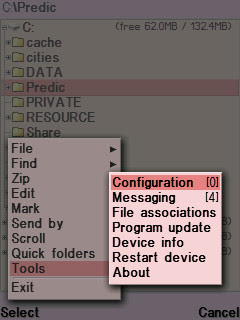
Install X-plore v1.34 . Open X-plore. First start to configuration of xplore which can be found on:
Menu>tools>configuration Or by just pressing 0
Select Show Romdrives
Select Show Ram drives
Select Show system files/Folders
If All ready then continue! By using x-plore
Go to C:
Access c:\sys
copy the files CProfDriver_SISX.ldd and Installserver.exe to C:\sys\bin
Now your phone is Hacked! Thats all, very fast,easy and simple! You are now ready to install any sis file which u know there is no expired certificates,no certificate errors again! just install anything u want!!!
This tutorial might be working for other phone in the list. I have not tried yet, if you successfully hack any phone in the list using my method, please let me know. Thx.
Pre-FP1 devices:
-------------------
Nokia N77
Nokia E61i
Nokia E65
Nokia N93i
Nokia N91 8GB
Nokia E62
Nokia E50
Nokia 5500
Nokia N93
Nokia N73
Nokia N80
Nokia N71
Nokia N92
Nokia E70
Nokia E60
Nokia E61
Nokia 3250
If your phone is the FP1 devices [check the list below]. Then you should use this installserver.exe instead.
Download from megaupload
Download from rapidshare
FP1 devices:
-------------------
Nokia N95
Nokia 6124 classic
Nokia N82
Nokia E51
Nokia N95 8GB
Nokia N81
Nokia N81 8GB
Nokia 6121 classic
Nokia 6120 classic
Nokia 5700 XpressMusic
Nokia 6110 Navigator
Nokia E90 Communicator
Nokia N76
Nokia 6290
Nokia E71
Nokia E66
Nokia E71
. Thank you.

Had you ever experience getting "certificate error" when trying to install software or game on your symbian phone? The "certificate error" is blocking you from installing all those great applications and games which will greatly enhances your symbian phone experiences. Without 3rd party applications, symbian phone is nothing more than an ordinary phone.
Hacking your phone is quite safe nowadays and you can done it in just few minutes.
The following tutorial is 100% working with Nokia N73 [4.0839.42.2.1] tested by myself.
First you need 4 files
CProfDriver_SISX.ldd
Installserver.exe
Secman v1.10.sis
X-plore v1.34
Download:
http://rapidshare.com/files/321705702/N73HACK.zip
mirror:
http://www.megaupload.com/?d=I93K2CIT
New link!!
http://www.multiupload.com/2Q6HY7K806
Easy steps to Hack/unlock your N73
Download the file and unzip to your pc.
Transfer the 4 files to your phone memory card.
install Secman v1.10.sis. When the installation is done, look in the Applications folder on your phone, and find SecMan. Open it and wait to load. Follow the instruction and it will auto reboot your phone.
Open it again and click on "Install Root Certificate". After that now Select turn platform security off.
Install X-plore v1.34 . Open X-plore. First start to configuration of xplore which can be found on:
Menu>tools>configuration Or by just pressing 0
Please make sure the following option is tick:
Select Show Hidden files Select Show Romdrives
Select Show Ram drives
Select Show system files/Folders
If All ready then continue! By using x-plore
Go to C:
Access c:\sys
copy the files CProfDriver_SISX.ldd and Installserver.exe to C:\sys\bin
Now your phone is Hacked! Thats all, very fast,easy and simple! You are now ready to install any sis file which u know there is no expired certificates,no certificate errors again! just install anything u want!!!
This tutorial might be working for other phone in the list. I have not tried yet, if you successfully hack any phone in the list using my method, please let me know. Thx.
Pre-FP1 devices:
-------------------
Nokia N77
Nokia E61i
Nokia E65
Nokia N93i
Nokia N91 8GB
Nokia E62
Nokia E50
Nokia 5500
Nokia N93
Nokia N73
Nokia N80
Nokia N71
Nokia N92
Nokia E70
Nokia E60
Nokia E61
Nokia 3250
If your phone is the FP1 devices [check the list below]. Then you should use this installserver.exe instead.
Download from megaupload
Download from rapidshare
FP1 devices:
-------------------
Nokia N95
Nokia 6124 classic
Nokia N82
Nokia E51
Nokia N95 8GB
Nokia N81
Nokia N81 8GB
Nokia 6121 classic
Nokia 6120 classic
Nokia 5700 XpressMusic
Nokia 6110 Navigator
Nokia E90 Communicator
Nokia N76
Nokia 6290
Nokia E71
Nokia E66
Nokia E71
. Thank you.

N70 UMTS lock (Triband I.E.Upgrade )
Attachments List:
1. .Nss.zip
2. .Namesis_service_suite__nss_.zip
Solved: Nokia N70 "UMTS (3G) - LOCK" Shared by md62 & DJ
wa163
Basic Principle for Online Upgrade
1. NSS: CHANGE PRODUCT CODE (e.g. 0547100)
2. NSU: ONLINE UPDATE
Basic System Requirements:
(contribution: vijay)
1. Microsoft Windows XP
2. Brodband Connection
3. Fully charged mobile
4. Data cable for N70
5. Good UPS Backup
NB: Cable that you can use are:
* CA-51 (originally bundled
in N70 package) or
* DKU2 (which tends to be more stable.)
Detailed Tutorial:
(contribution: md62)
STEP 1
: Download NSS (Nemesis
Service Suite) download here. Install NSS on your computer.
During installation, you would be prompted to choose the service. ChooseVirtual USB Devices.
STEP 2
: Now download the Nokia
Sofware Updater from the link
SoftPedia
or
from Nokia Official Site
Choose the build which is for N70 white.
Download and Install it.
STEP 3
: Download and Install Nokia PC Suite (PCS).
STEP 4
: Connect your phone to your PC. Make sure your cable connection is stable and don't
touch your cable anymore unless instructed.
STEP 5a
: After your phone is connected, launch NSS. You
can see there's a discovery (Magnifying Glass) icon at right
top corner there.
Click it to let NSS detect device information. After those information generated, click on PHONE INFO TAB (second icon from left).
STEP 5b
: Key in the product
code.
Most Extensively Tested Product Code is 0547100
Enter it and check the enable checkbox.
[NB: The product key varies depends on what kind of firmware you wish to update.
More Info below...]
STEP 5c
: After entered your product code, click WRITE BUTTON and wait till the update is
complete.
[NB: You may click on read
button to verify your product code again, if succesful, you'll see the new code.]
STEP 6
: Follow the instructions given inside the NSU Update Wizard closely and do not touch
the cable until whole update
process is completed.
STEP 7
: After finish the update, your phone now is N70 Internet Edition or Compatible. You would notice there are THREE TIER options fot network selection.
viz.
Dual, GSM, and the newly added UMTS.
Step by Step Screens
(contribution: md62)
.
.
.
And now you got it
.
.
Additional Info on Product Codes:
(contribution: md62)
Skip if you're running short of time
N70 *Internet Edition* Product Codes:
0547100 (Most Extensively Tested) 0515126 0515284 0519653
#051528-untested
N70 Music Edition Product Codes:
0519653 -Tested
0547100 -Tested
#0539266=APAC -untested
0539272 0539273 0539353
0539275 05392756
#0539270=EMEA -Untested
0515281 0515284
More Recent Product Code can be found using NaviFirm
Online Upgrade is even possible with 5.07.05.3.0.1
Just remember, people having existing 5.07.05.3.0.1 firmware can also perform same version REFLASH using NSS, with the following product code
Change Product Code to 0547100
THAT'S IT. THE SAME VERSION WILL BE RELOADED, BUT WITH TRIBAND INTERNET EDITION.
TIP:
* Earlier versions can try any of the tested product codes posted here.
# People having Later versions should NOT upgrade/downgrade. Its dangerous.
About The Copy/Share/Paste of Z drive files:
Skip if you're running short of time
Unfortunately enough, just by "Copy Share and Paste" of
z:\system\apps\gs
wont do the trick, contrary to what was proposed earlier.
It was a misconception. So, forget the dream. There's a number of probable reasons why it doesn't work
Number 1
Due to having same uid, the default Settings App will launch. Z drive enjoys the system preference.
Number 2
The function depends upon many system libraries, which wont show triband until you completely flash them out.
Moral of the story:
There's no SHORTCUT, you have to Flash to get the Flesh
Our Final verdict
Skip if you're running short of time
Change Product Code: 0547100 OR ANY OF THE TESTED ONES.
Upgrade Online with Nokia Software Updater.
* Its 1000% safe...
# We currently donot recommend
Offline Upgrade/downgrade.
# No primitive confusion will be entertained hereafter...
Try it first.
Only Technical problems will be answered.
Disclaimer:
Don't Skip even if you're running short of time
WARNING!! Before you start, you
must clearly understand that this process is considered quite risky. If you don't follow the steps correctly, you might damage your phone severely or even BRICK it!
THIS PROCEDURE CAN VOID YOUR
WARRANTY AND IT WILL BE UR OWN
RESPONSIBILITY FOR ANY KIND
OF RISK INVOLVED WHEN U
PERFORM THIS CARELESSLY.
Although, if you follow the steps properly, you have 99.9999% chance of success with Online Upgrade.
Still, any sort of damage whatsoever that may be caused to your device wont be at all on our responsibility.
Subscribe to:
Posts (Atom)